Showing posts with label Tip. Show all posts

Jul 21, 2006

Get rid of Windows Update restart nag

The Stuff that's in my head weblog posts a simple tip for removing the annoying Windows Update nag that pops up asking you over and over again whether you'd like to restart your computer now or later.
Now, to get rid of it:Start / Run / gpedit.msc / Local Computer Policy / Computer Configuration / Administrative Templates / Windows Components / Windows Update / Re-prompt for restart with scheduled installationsNow, to get rid of it:Start / Run / gpedit.msc / Local Computer Policy / Computer Configuration / Administrative Templates / Windows Components / Windows Update / Re-prompt for restart with scheduled installations
Seems simple enough. Obviously you should still get to restarting your computer eventually, but really, Windows - how many times in an hour do we need to be reminded that you're desperate for our restarting attention? Just let us work. ? Adam Pash

A little knowledge is a dangerous thing. so is a lot

어설픈 지식은 위험한 것이다, 그것도 아주 많이.
- Albert Einstein

Jun 10, 2006

How To Clean an LCD Panel

lifehacker에서 찾은 상식. 원 출처는 Apple. 이것 역시 허접 독해는 다음에 시간 날 때.


This article describes the best way to clean an LCD panel such as those used on PowerBook computers and Apple flat panel displays.

To clean the LCD:
1. Turn off the computer or display. You may need to turn off the computer in order to turn off some Apple displays.
2. Dampen a clean, soft, lint-free cloth or paper with water only.
3. Wipe the screen. Do not spray liquid directly on the screen.

You may also use a mild glass cleaner that contains no alcohol or ammonia. Most office supply stores sell cleaning kits specifically designed for this purpose.

While there are many commercial products available that will work without damaging the plastics, Apple has tested a product called Klear Screen made by Meridrew Enterprises (http://www.klearscreen.com) and found it does not cause any harm to the plastics. This product may not be available worldwide.

Information about products not manufactured by Apple is provided for information purposes only, and does not constitute Apple's recommendation or endorsement. Please contact the vendor for additional information.
The following article can help you search for a particular vendor's address and phone number:

Jun 8, 2006

Get rid of Thumbs.db

허접 독해는 다음에 시간 날 때. ^^ 미리보기를 사용하지 않을 때 이거 짜증남.
Get rid of Thumbs.db

There’s a file called Thumbs.db in almost every one of the folders on my computer. What is it and how do I get rid of it?
Thumbs.db is a system file generated automatically by Windows XP when you view the contents of a folder in “Thumbnail” or “Filmstrip” view. Thumbs.db contains a copy of each of the tiny preview images generated for image files in that folder so that they load up quickly the next time you browse that folder. Thumbs.db also stores your settings with regard to thumbnail and filmstrip view.
Despite the fact that Thumbs.db is a hidden system file, it annoys people because it tends to show up in places where it’s not wanted. Many times you’ll try to zip up a folder full of images and e-mail them to a friend or upload them to an FTP site, and Thumbs.db goes along for the ride.
To stop your computer from generating and regenerating future Thumbs.db files, do the following:
If you’re on the desktop…
Click Start Double-click Control Panel Double-click Folder Options
Or, if you have My Computer open and are browsing any folder in your system…
Click Tools (next to File, Edit, View at the top of the screen) Click Folder Options
After performing either of those two operations, the “Folder Options” window will open up.
Click on the View tab Check off the circle next to Do not cache thumbnails Click the Ok button
Once you click the Ok button, your computer will cease to generate Thumbs.db files. If you delete any of the existing Thumbs.db files, they will not return. Be forewarned though, if you browse a folder that contains a large quantity of image files (or extremely large image files), it will take a long time for that folder to load even if you have previously browsed it because the thumbnail images will not have been cached in Thumbs.db.

YouTube Downloader


youtube에서 마음에 드는 동영상을 저장하시고 싶을때는
여기로 가시면 다운 받으실 수 있습니다.
아래의 순서대로 하신 후 Flash Video Player를 이용해서 보시면 됩니다. youtube의 flv는 저화질입니다.^^
How to download video
1) Enter the YouTube Video URL
2) Click "Get Download URL"
3) Right click "Download URL"
4) Save target as "*.flv"

Jun 7, 2006

Death Forecast : 수명을 예측해보세요

정확하지는 않을테지만 재미로 볼 수 있을 것 같다. 결과에 따른 남은 인생을 잘 살아보세^^
나의 예상수명은 그림과 같다

Death Forecast 에서 알아보실수 있습니다. <-- Click

May 30, 2006

생활의 지혜II : 셔츠 접기 Wisdom for living : folding shirt

시도를 했는데 난 잘 안됨.ㅜㅜ. 한번 시도를.


May 27, 2006

모기 덫을 만들자 Quick and Dirty Mosquito Trap

조금 머리가 복잡하여 다른 곳에서 그냥 copy and paste. 야외에서나 또는 필요할 경우가 있을 것 같다.

Quick and Dirty Mosquito Trap

Update: I have contacted our Chinese DIY:happy operative Shana from iRocks for a more accurate translation. Turns out I was way off, so check out the updated and translated instructions.
How to build a Mosquito trap.
Materials Needed: 필요한 것들
2000ml (2 liter) bottle 2리터 페트병
50 gram (brown?) sugar 흑설탕 50그램
1 gram yeast 이스트 1그램
Thermometer 온도계 Measure cup 계량컵
Knife 칼 Black paper 검은색 종이


1. Cut the top of the bottle as shown 그림1에 보이는 것 처럼 잘라라.

2. Put 200ml hot water in the bottle, stir with 50gram brown sugar. Put the sugar water in cold water to cool it down til 40C (temperature).
They use a bigger container with cold water - put the small cup that they use to make sugar water in that container and that stick is a thermometer because they want the sugar water to cool down to 40C (temperature).
자른 병에 200ml의 뜨거운 물을 붓고 50gram의 흑설탕을 넣어 저어라, 설탕물을 냉수를 이용하여 40도까지 식혀라. 큰 용기에 냉수를 붓고 그 속에 작은 용기의 설탕물을 넣어 온도계를 이용하여 40도까지 낯추라는 것 같다.(참 친절하게 설명하는 것 같아서 읽어보지도 않았다.)
3. After cooling down, put the sugar water in the bottle then add the yeast.No need to mix the yeast with the sugar water. When yeast ferments, it creates carbon dioxide.식힌 후 자른 페트병 속에 설탕물은 넣고 이스트를 첨가해라. 저을 필요는 없다. 이스트가 발효하면서 카본 디옥사이드를 만들어낸다.


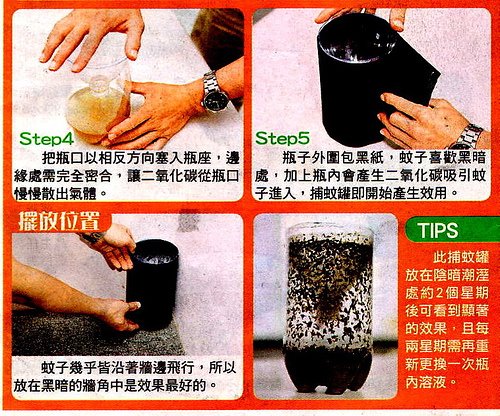
4. When you cut the bottle, dont throw the top part away because that’d be needed for step 4 - you see they put the top upside down to fit into the bottle.
Carbon dioxide will be released from where we drink the bottle so make sure to seal the edge. 페트병을 자를 때 윗부분을 버리면 안된다. 4단계에서 필요하기에. 병의 자른 윗부분을 뒤집어서 그림과 같이 병에 끼워넣어라. 병의 자른 부분과 윗부분의 가장자리를 꼭 봉인한다.
5. Put black paper around the bottle since mosquitos like dark places and carbon dioxide. This mosquito trap will then start working.Mosquitos fly around the corner, so the best place to place the trap is at some dark corner.검은 종이를 병의 주위에 붙여라 모기들은 어두운 곳과 카본 디옥사이드를 좋아한다. 이제 이 덫은 작동한다. 이 병을 어두운 구석에 잘 모셔두면 끝이다.
TIPS: Put the trap in some dark and humid place for 2 weeks, you’ll see the effect. You’ll have to replace the sugar water + yeast solution every 2 weeks.
이 덫을 어둡고 습기진 곳에 2주간 두면 그 효과를 볼 것이다. 내용물은 2주마다 교체하면 된다.

날씨도 더워지고 모기의 계절이라 필요할 것 같아 메모한다.

May 21, 2006

Optical illusion

눈에 보이는 그대로가 진실은 아니다. 실제로 A와 B의 색은 같다.

Optical illusionWikipedia 에 더 많은 정보가 있습니다.

May 15, 2006

Wisdom for Living-생활의 지혜

How to peel cooked potato skin in one shot.
감자 한방에 까기


how to make an ashtray
재떨이 만들기


peeling eggs
삶은 계란 한방에 까기

May 9, 2006

mmm free

이것 저것 프로그램을 깔다보면 Context Menu(문맥메뉴;오른쪽 마우스버튼 메뉴)가 엄청나게 길어지고 지저분 해져 메뉴 찾는 것도 힘들다. 지저분한 context menu를 이 유틸로 깔끔하게 정리할 수 있다. 게다가 프리웨어다. 상용버전은 조금 더 강력한 기능을 가지고 있지만 프리웨어도 충분히 쓸만하다.

http://www.hace.us-inc.com/ 에 가면 다운 받을 수 있다.

설정은 Context Menu에서 색이 있는 부분의 원형버튼을 클릭하면 아래와 같은 메뉴를 통해서 하면된다.

GoldenSecton Notes 1.3 127


쪽지 프로그램으로 여러가지를 사용해봤지만 꼭 맘에 드는 걸 못 찾았었는데 이 프로그램은 쓸만하다. 비슷한 프로그램으로 jwfreenotes라는 국산프로그램도 있었던걸로 기억한다. 하여튼 프리웨어로 구할 수 있는 마지막 버전인 GoldenSection Notes 1.3 127은 메모의 정리라는 측면에서만 사용한다면 아직 충분히 사용할 만하다. 이후의 버전은 Shareware이며 최신버전은 3.3 961이다.
프로그램에 관한 정보는 TGS labs에서 확인하세요.

http://downloads.5star-network.com/Business/gsnotes.zip

Process Explorer


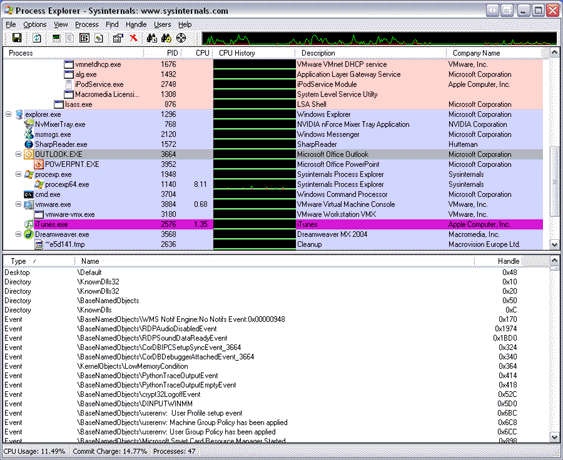
MS-Windows에서 프로그램이 멈추거나 충돌을 할 경우 CTRL+ALT+DEL 을 누르면 작업관리가 실행이 된다. 이 작업관리자를 사용하면서 불만을 가지지 않은 사람은 아마 거의 없을 것이다. 그 불만을 해소할 수 있는 프로그램이 바로 Process Explorer이다.
이 프로그램은 프리웨어인데다 설치할 필요도 없고 만족할 만한 성능에 빠르기까지 하다. 작업관리자를 완벽히 대체하며 작업관리자 대체 메뉴를 체크하면 CTRL+ALT+DEL로도 실행가능하며 다시는 작업관리자를 사용할 일이 없을 것이다. www.sysinternals.com에 가면 이외에도 다양한 기능을 가진 FREEWARE들이 즐비하다.

Sysinernal Freeware Process Explorer에 가면 작업관리자를 완벽히 대체할 수 있는 이 프로그램에 관한 정보와 다운로드를 제공한다.

May 6, 2006

Make Beer


맥주 만드는 법 Make Beer 을 링크해본다. 그런데 시도는 못해볼 듯.^^

May 3, 2006

Steve Jobs: Build Your Dreams

copy from Steve Jobs: Build Your Dreams in Google Operating System
위 사이트에 있는 것을 무단전재했습니다. 좋은 말인 것 같아서.
그리고 번역은 대충 이런 뜻일거야 라는 짐작에서 맘대로 붙이고 뺐습니다.
원문은 동영상 밑 또는 위 링크로 가시면 됩니다.

듣고 읽다 보니 memento mori라는 말이 생각나는 군요.

이 영상은 스탠포드대학 졸업식에서 Steve Jobs가 2005년에 연설한 것입니다. 주요내용은 아래와 같습니다.

"만약 당신이 오늘이 생의 마지막이라 생각하며 하루하루를 살아간다면, 앞으로 확실히 뭔가를 이룰 수 있을 것이다."

"죽음은 어떤 누구도 회피할 수 없고 공유해야 만 하는 우리 모두의 종착지이다. 그럴 수 밖에 없는 것이 죽음은 인생이 만들어 내는 유일무이한 것이기 때문이다."

"인생에 있어서 큰 선택을 할때 도움을 주는 최고의 도구는 나는 머지않아 죽음을 맞아야 한다는 것을 기억하는 것이다. 왜냐하면 거의 모든 것들, 모든 외적 기대들, 모든 자부심, 실패와 좌절에의 모든 두려움-이러한 모든 것들은 진정으로 중요한 것만을 남기는 죽음앞에서는 단지 사그라질 뿐이다. 죽음을 기억한다는 것은 실패할 것이라는 생각의 함정에서 벗어 날 수 있는 최고의 방법이다. 죽음 앞에서 너는 이미 아무 것도 잃을 것이 없는 벌거숭이므로, 네가 진정으로 원하는 것을 하지 않을 이유는 전혀 없다는 것이다."

"하고자 하는 일을 제대로 성취하는 유일한 방법은 네가 하고자 하는 일을 사랑하는 것이다. 만약 아직 찾지 못했다면, 끊임없이 찾아라. 절대 멈추지 말라. 가슴이 시키는 대로만 한다면 그것을 찾았을 때 자연스럽게 알게 될 것이다."


The video is from Stanford Graduate Commencement address delivered by Steve Jobs on June 12, 2005. Some key quotes:

"If you live each day as if it was your last, someday you'll most certainly be right."

"Death is the destination we all share, no one has ever escaped it. And that is as it should be because death is very likely the single best invention of life."

"Remembering that I'll be dead soon is the most important tool I've ever encountered to help me make the big choices in life. Because almost everything ? all external expectations, all pride, all fear of embarrassment or failure - these things just fall away in the face of death, leaving only what is truly important. Remembering that you are going to die is the best way I know to avoid the trap of thinking you have something to lose. You are already naked. There is no reason not to follow your heart."

"The only way to do great work is to love what you do. If you haven't found it yet, keep looking. Don't settle. As with all matters of the heart, you'll know when you find it."

* Steve Jobs co-founded Apple with Steve Wozniak in 1976, and a year later launched the Apple II - the first desktop computer to have a built-in keyboard, built-in sound and that could produce color graphics when hooked to a color television.


memento mori ; wikipedia
-
Memento mori is a Latin phrase that may be freely translated as "Remember that you are mortal," "Remember you will die," or "Remember your death". It names a genre of artistic creations that vary widely from one another, but which all share the same purpose, which is to remind people of their own mortality.

Apr 30, 2006

Total Commander


파일 매니저로 윈도탐색기를 주로 사용하다 빈약한 성능과 윈도와 연계된 시스템 다운에 지쳐서 다른 방법이 없을까 고민하던 중 몇 달 전에 이걸로 바꿨는데 대만족. 아직은 제대로 활용을 못하고 있지만 왠만한 작업 또는 음악을 듣고 그림을 보는 정도는 이걸로 다 해결. 게다가 탐색기보다 안정적이고 속도도 빠르다. 워낙 플러그인이 다양하고 활용법도 다양해 여전히 또 앞으로도 배워가면서 써야 하겠지만 나름대로 즐거이 사용중. 윈도탐색기에 싫증이 났다면 사용해 볼 것을 권하고 싶다. 가장 맘에 드는 건 알집과 같은 내가 싫어하는 프로그램을 플러그인으로 해결할 수 있다는 것이다. 근래 들어 설치해서 사용해 본 프로그램 중에는 가장 맘에 든다. 상용이긴 하지만 처음에 뜨는 등록 메시지 몇번 클릭하는 수고만 하면 계속 사용할 수 있다는 말도 있고 부담없이 사용할 수 있을 것 같다.
ps 쓰다 보면 dos시절의 mdir도 생각이 난다. 지금까지 꾸준히 업그레이드 되었다면 이에 못지않은 프로그램이 되었을텐데 하는 아쉬움이 생긴다. mdir을 기억하나요? ^^

여기에서 리팩버전을 받을 수도 있을 것이다.

Apr 15, 2006

good words

상대방의 의견은 자신과 다릅니다.
틀린 게 아닙니다.

gomufan이라는 사이트에서 캠페인중인 말.

우리는 이 말을 전혀 이해하지 못하고
자신만의 세계에서 살아가고 있는 건 아닐까?
일단 의견의 옳고 그름을 떠나서 다르다고 인정하자.
그 원인과 과정 결과등을 찬찬히 보면 뭔가 자신과 다를 것이다.
결과보다는 그 도출과정을 중요시하자.

그냥 자다 일어나서 든 생각

Apr 10, 2006

Useful WinXp dos commands and tricks 유용한 도스명령어들

lifehacker에 있는 글을 그냥 긁어온 것임(물론 허락은 안 받았다)
그중 몇 개만 해석해봤음. 순전히 내가 필요해서 (난 컴퓨터에 뭔가 저장을 잘 하지 않는다, 따라서 여기 저장을)윈도에서 가장 효율적이고 빠른 작업 방법은 실행명령을 사용하는 것이다.
여기에 윈도에서 실행가능한 가장 유용한 도스명령어 몇가지를 소개한다
.

도스 명령은 cmd.exe의 프롬프트에서 실행되어야만한다.
(star시작>run실행>cmd.exe의 순서로 창을 띄워서 작업하란 말)

ipconfig - Windows IP 설정
인터넷 연결 문제해결에 있어서 유용하다.현재 컴퓨터의 아이피주소와 DNS서버주소를 보여준다. 만약에 통신회사에 접속불량등을 신고하면 그는 분명 이 명령을 실행하라고 할것이다.
/all /renew /release 등의 유용한 명령스위치를 가지고 있다.


type 노트패드처럼 텍스트 파일을 연다.
유닉스의 cat명령과 비슷하다. Type은 텍스트의 수정없이 내용을 보여주는
도스명령어.몇개의 스위치키와 함께 사용하면 좀 더 유용하다.

ping 이건 아마 모두 알지 않을까?
이 네트웍 명령어는 컴퓨터의 웹주소나 아이피주소에 따라서 상대방과의 연결상태를 보여주며, 이 툴은 웹주소를 아이피 주소로 바꾸어 표시하는방법으로 쓰일 수도 있다.


tree 디렉토리 구조를 트리형태로 보여준다. 아마도 물리적디렉토리의 구조를 프린트할 필요가 있을때 xp는 그러한 기능을 가진 간단한 명령이 없다. 그러한 경우라면 tree명령을 사용해 보라. 그리고 텍스트 파일로 출력하면된다.
tree > mydirectry.txt
print mydirectory.txt


위 명령들의 자세한 용법은 명령행 상에서 명령을 입력하고 /?를 입력하면 됨.

Apr 5, 2006

Qooqle Video


Qooqle Video
u cand find any video as you want.(not sure)
but this is damn good thing.
지금은 제대로 서비스를 안 하는 것 같다. 어차피 Youtube기반이었으니. 2006-05-09 08:02:39 수정
다시 잘 되고 있다.2006-10-05 08:58:04